Ace every tech interview with your
invisible AI assistant.
A desktop app that stays hidden when you share your screen, listens to the interviewer's question and answers it for you, and solves coding questions from a single screenshot.
 Gemini
“
AI answer
Waiting for the question…
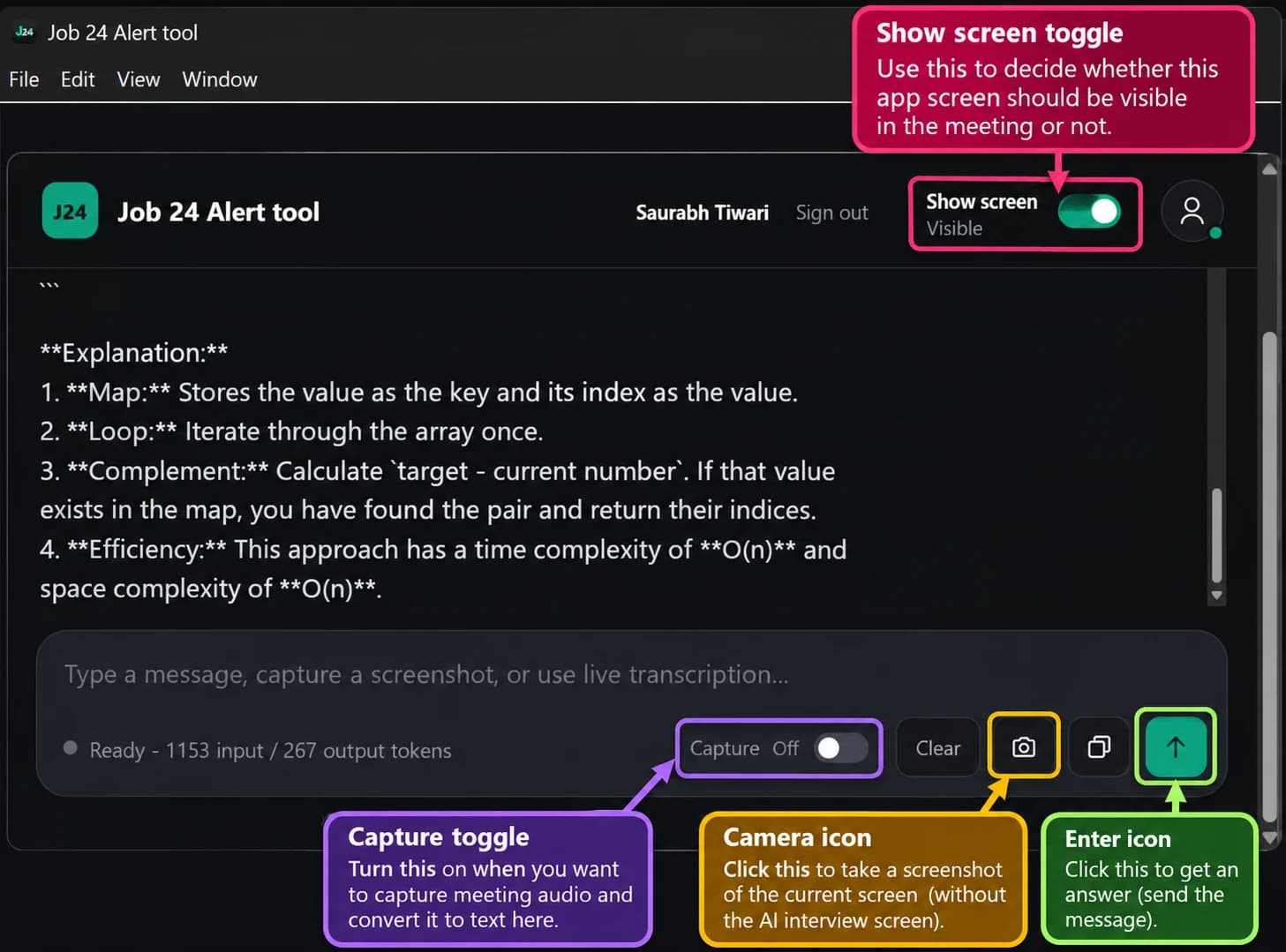
This is how our app works
Use the labeled controls to choose when the assistant is visible, capture meeting audio, take a screenshot, and send your question for an answer.
Built for the moment it matters
Hidden from screen share
Stays privateThe app window is excluded from screen capture. Share your whole screen on Google Meet and the other side sees your screen without the assistant on it.
Hears the question for you
Powered by ElevenLabsIt listens to your computer's audio, turns the interviewer's question into text in real time, and answers it. No typing needed.
Solve from a screenshot
Coding roundsStuck on a LeetCode or coding question? Take a screenshot in the app and get an explained solution with code.
Answers you can say out loud
Powered by GeminiShort, clear points instead of long essays, so you can glance and speak naturally. Edit the prompt to change the style.
See it in action
Filmed with a phone on a real laptop.
Invisible when you share your screen
Recorded during a Google Meet screen share. The assistant is open on the laptop, but it doesn't appear in what the other person sees.
Screenshot any coding question, get the answer
Take a screenshot of the LeetCode or coding question you're facing, and the assistant reads it and writes the solution.
Hears the question and answers automatically
It picks up the interviewer's voice from your computer's audio, transcribes it live and gives you the answer, with no typing.
Get Job 24 Alert Tool
Choose your computer. Everything it needs is inside the installer.
Windows
Windows 10 / 11, 64-bit
- File
- Installer (.exe)
- Size
- 306 MB
Mac (Apple Silicon)
M1, M2, M3, M4
- File
- Disk image (.dmg)
- Size
- 328 MB
Mac (Intel)
Intel-based Macs
- File
- Disk image (.dmg)
- Size
- 347 MB
Ready in 3 steps
Download and install
Pick your computer above and run the installer.
Enter your access key
Open your profile on Job Alert 24, copy your access key and paste it into the app.
Join your call
Start your meeting. The assistant listens, and you can screenshot coding questions any time.
Needs PRO+. See plans
Frequently asked questions
Walk into your next interview with confidence.
Install it once, and it's there for every interview.
Download the app